

Plugins
Plugins are one of the main ways to customize Player to suite individual use-cases. Internally they allow access to many of the core sub-systems, which can add features, configuration, or custom behaviors.
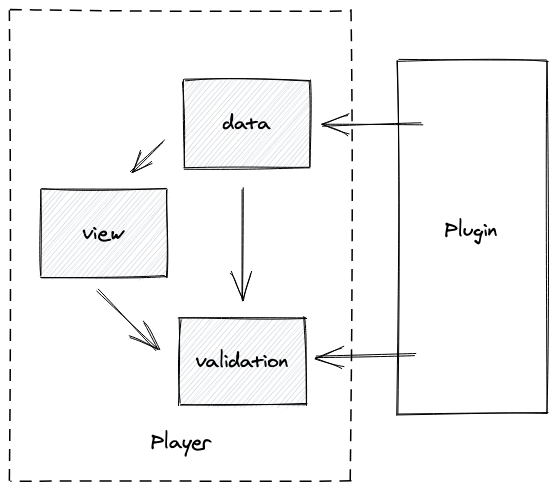
The scope of what a plugin is capable of is pretty broad, but are typically broken down into smaller reusable modules. Some are more end-user focused (Common Expression Plugin and Common Types Plugin) while others are more relavant for other plugin developers (Expression Plugin and Types Provider Plugin)
Architecture
Section titled “Architecture”When you write a plugin, you’re typically interacting with:
- hooks: Tapable-style extension points on
Playerand its controllers - controllers: the runtime subsystems created for a given
player.start(flow)run (flow/view/data/etc)
The key idea: controllers are created per-run. Don’t assume they live forever.
Per-Flow Lifecycle
Section titled “Per-Flow Lifecycle”On each player.start(flow) call, Player creates a new controller set and publishes them through hooks.
For plugin authors, this means:
- If you store
dataController,flowController, etc, overwrite them on each run - Prefer tapping hooks to observe lifecycle moments vs “holding on” to objects long-term
Main Hook Surfaces
Section titled “Main Hook Surfaces”This is the set of top-level hook entry points exposed by the core Player object. Plugins tap these hooks to get access to the corresponding controller instances for a run.
| Hook | Gives you | Use it when… |
|---|---|---|
player.hooks.state | Player lifecycle state (not-started / in-progress / completed / error) | You want a single place to grab the active run controllers (state.controllers). |
player.hooks.flowController | FlowController | You want to observe or affect navigation transitions (via nested flow hooks). |
player.hooks.viewController | ViewController | You want to react to view changes or update behavior. |
player.hooks.view | ViewInstance | You want to attach view-scoped behavior when a new view is entered. |
player.hooks.dataController | DataController | You want to observe or augment data pipeline behavior (sets, defaults, formatting, updates). |
player.hooks.expressionEvaluator | ExpressionEvaluator | You want to add/override expression functions or observe evaluation errors. |
player.hooks.schema / player.hooks.validationController | schema + validation controllers | You need schema-driven formatting or validation behavior. |
player.hooks.bindingParser | BindingParser | You need custom binding parsing/routing or to wrap parse/evaluate plumbing. |
Getting Controllers in One Place
Section titled “Getting Controllers in One Place”If you want a single “entry point” that gives you the current controllers for the active run, tap player.hooks.state and look for in-progress:
import type { Player, PlayerPlugin, InProgressState } from "@player-ui/player";
export class MyPlugin implements PlayerPlugin {  name = "my-plugin";
  apply(player: Player) {    player.hooks.state.tap(this.name, (state) => {      if (state.status !== "in-progress") return;
      const controllers = (state as InProgressState).controllers;      // controllers.data / controllers.view / controllers.flow / ...    });  }}
Notes:
- After completion, Player exposes only a read-only data controller in the completed state.
- In core Player, these hooks are implemented with
tapable-tssync hooks (SyncHook,SyncWaterfallHook,SyncBailHook), so handlers run synchronously.
Nested Hooks
Section titled “Nested Hooks”Some lifecycle points are nested a level down:
apply(player: Player) { player.hooks.flowController.tap(this.name, (flowController) => { flowController.hooks.flow.tap(this.name, (flow) => { flow.hooks.transition.tap(this.name, (from, to) => { player.logger.debug("Transition %s -> %s", from?.name, to.name); }); }); });}This is a common shape in Player plugins: “tap a controller hook to access a deeper hook surface”.
- View AST Explorer
- Preview the internal AST representation of a view (often referenced during the transform phase).
- DSL Content Playground
- Explore authoring content using the DSL and the reference assets.
- Storybook integration
- The Events panel shows logs, render/update metrics, data mutations, and more as a flow is processed.